







.png)
 简体中文

VenusLiv V2
Built for live commerce and marathon broadcasts
- 4K30 · 6x Hybrid Zoom
- Standalone Streaming
- Gigabit LAN + Wi-Fi

Hollyland's live streaming cameras are purpose-built for sellers, creators, and broadcasters who demand 4K quality without a PC. Stream directly to TikTok, Shopee, YouTube, and more — with fast autofocus, 24/7 operation, and studio-grade tools in every device.
Works with TikTok Shop, Shopee, YouTube, Instagram & more — no capture card needed.

| Model |
VenusLiv V2
|
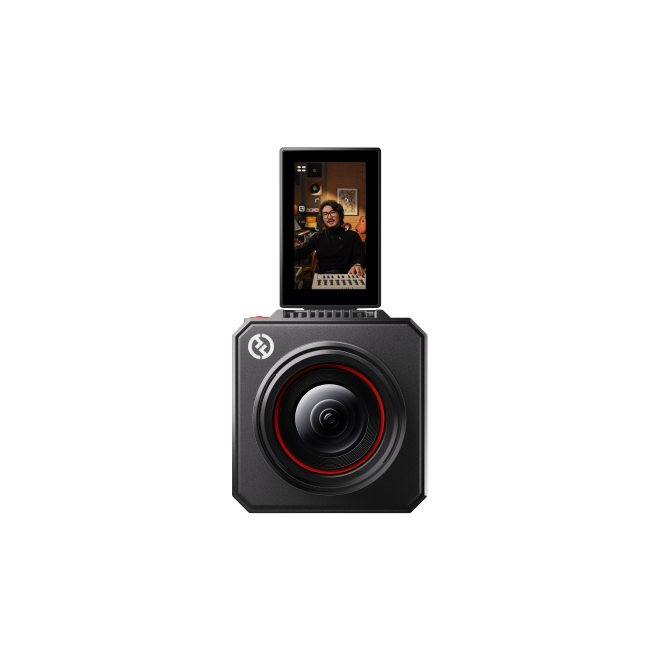 VenusLiv Air |
|---|---|---|
| Best For | Live commerce sellers, product zoom demos & marathon streams | Studio creators, podcasters & low-light environments |
| Image Sensor | Sony 1/2" CMOS (12 MP) | 1/1.3-inch CMOS (50 MP) |
| Lens Aperture | F6.3–F10 | F1.05 |
| Video Resolution | 4K @ 30fps | 4K @ 30fps (RTMP); 4K @ 30fps / 1080p @ 60fps (UVC) |
| Zoom Range | 6x Hybrid Zoom (3x Optical + 2x Digital) | 4x Digital Zoom |
| Autofocus System | Fast Hybrid Autofocus (Min. distance: 50 cm) | Hybrid AF — Phase + Contrast Detection, Continuous Focus |
| Touchscreen Display | 5-inch LCD Touchscreen (1080 × 1920px) | 3-inch TFT Touchscreen (480p) |
| Network Connectivity | Dual-Band Wi-Fi (2.4 / 5 GHz) + Gigabit LAN | Dual-Band Wi-Fi (2.4 / 5 GHz) + Gigabit LAN |
| Standalone Streaming | Yes — HollyOS 2.0 with built-in platform apps (TikTok, Shopee, Instagram & more) | Yes — RTMP streaming with built-in apps |
| UVC Webcam Output | Yes — USB-C 3.1 | Yes — USB-C 3.0 (4K @ 30fps / 1080p @ 60fps) |
| Audio Input | 3.5mm Jack + USB-C Wireless Mic Input | 3.5mm Jack + USB-C Wireless Mic Input |
| Power Options | DC 12V Adapter or Sony NP-F Battery (≤15W) | DC 12V only (Max 10W) |
| Weight | ~1,000g (35.3 oz) | ~660g (body only) |
| Shop | Shop |
This is the most important question to answer before anything else — and the answer shapes every other decision.
Standalone streaming means the camera connects directly to the internet and broadcasts independently, with no PC, capture card, or encoding software required. It's the right choice if you:
PC-connected (UVC) streaming means using the camera as a premium webcam source fed into OBS, Streamlabs, Zoom, or similar software. This suits users who:
Both VenusLiv cameras support standalone RTMP streaming and UVC output. The VenusLiv V2, with its large 5" touchscreen and one-tap stream controls, is optimized for standalone commerce use. The VenusLiv Air's compact desktop profile and plug-and-play UVC output make it a natural fit for creator and podcasting setups centered around a PC.
The image sensor determines how much light the camera captures — and it has a direct impact on image quality in real-world streaming environments.
Prioritize a larger sensor if you:
A smaller sensor is sufficient if you:
Before purchasing, confirm your primary streaming platform is natively supported. Most professional live streaming cameras broadcast via RTMP, which is universally compatible with TikTok, Instagram, Shopee, YouTube, Twitch, Facebook Live, and any platform that accepts a custom RTMP stream URL.
Connection stability matters as much as platform support. A dropped stream mid-broadcast can disrupt a sale, lose an audience, or damage credibility. Two connection types to understand:
Look for cameras that support both wired and wireless connections. Default to Ethernet at a fixed studio; switch to Wi-Fi when flexibility is needed.
For live streaming, autofocus isn't a luxury — it's a requirement. Whether you're presenting a product, moving around a space, or reframing between multiple subjects, the camera needs to lock on quickly and hold that lock throughout the session.
Key autofocus features to evaluate:
If your stream involves rapid product movement, solo hosting, or frequent reframing, treat autofocus performance as a primary criterion — not an afterthought.
Marathon streams — whether a 12-hour commerce event, a charity stream, or a daily live selling schedule — place unique demands on hardware. Two factors determine whether a camera can sustain extended use:
Thermal Management
Live streaming generates continuous heat. Cameras engineered for 24/7 operation include dedicated heat dissipation systems that prevent performance throttling, automatic shutdowns, or image degradation over long sessions. If you stream for more than 2–3 hours at a stretch, confirmed thermal management is non-negotiable.
Power Options
Your physical setup should guide how much camera you need.
A compact, lightweight camera (under 700g, smaller footprint) is better suited for:
A larger, full-featured camera (more I/O ports, bigger touchscreen, expanded physical controls) is better suited for:
The VenusLiv Air at ~660g fits naturally on a desk, mic arm, or compact tripod in a creator studio. The VenusLiv V2, with its 5" touchscreen and broader I/O suite, is built for sellers and operators who need full control at their fingertips during an active broadcast.
Video quality earns attention, but audio quality determines whether people stay. Evaluate a camera's audio input options carefully before committing:
If you're pairing a wireless microphone system with your camera, confirm direct wireless mic input via USB-C is supported. It simplifies cabling significantly and removes the need for an external audio interface entirely.
Hollyland VenusLiv Air streamlined our entire workflow — plug, switch, and go. It just works, and that’s exactly what you want in production.
Jeroen Visser Co-founder of Podcast Junkies, a creative studio in the Netherlands
What I liked most is that it lowers the technical barrier. You can achieve a professional-looking stream without building a complex setup.
Bruno Vargas Co-founder at HUB Locadora, an audiovisual equipment rental company
The camera was easy to integrate and set up compared to other PTZ systems we had on ground. Its color reproduction stood out, delivering very natural and accurate colors.
Fafore John Founder of Rubysmith Visuals, a creative and media production brand
No — and that's one of the biggest advantages of the VenusLiv lineup. Both the VenusLiv V2 and VenusLiv Air function as fully standalone streaming devices. The V2 runs HollyOS 2.0 with built-in platform apps, so you can go live with one tap directly to TikTok, Shopee, Instagram, or any RTMP destination — no laptop, no capture card, no encoder required. The VenusLiv Air supports standalone RTMP streaming via Wi-Fi or wired LAN as well.
That said, both cameras also work as plug-and-play UVC webcams when connected to a PC or Mac via USB-C, making them equally at home in an OBS or Streamlabs setup. Whether you're streaming solo from a shelf or running a full desktop studio, there's no complex configuration to get started.
Both cameras support RTMP-based streaming — the universal protocol used by TikTok, TikTok Shop, Shopee Live, Instagram Live, YouTube Live, Twitch, Facebook Live, and any other platform that accepts a custom RTMP stream URL.
The VenusLiv V2 goes a step further with pre-configured platform apps built into HollyOS 2.0, giving live commerce sellers one-tap access to the most popular destinations without manually entering stream keys. If your platform supports RTMP, these cameras support your platform.
Both the VenusLiv V2 and VenusLiv Air are purpose-built for continuous, long-session operation. Each features an active thermal management system designed to sustain 24/7 non-stop streaming without throttling or shutting down from heat.
For power, both cameras run on a stable DC input (12V), so you're not racing against a battery. The VenusLiv V2 also supports Sony NP-F series batteries as a backup — useful during setup transitions or in spaces where a wall outlet isn't within reach. For marathon commerce events, charity streams, or all-day product launches, either camera is built to run as long as you do.
Both cameras use hybrid autofocus systems that combine phase-detection and contrast-detection for fast, accurate subject acquisition.
In practice, both cameras lock and hold focus confidently during live product demos, solo talking-head streams, and situations where you're moving items in and out of frame — without the hunting or lag that can disrupt a live broadcast.
Yes. Both cameras include a dedicated USB-C port for wireless microphone input (UAC-compatible digital audio), allowing direct connection without an adapter or mixer. Both models also feature a 3.5mm analog audio jack for standard wired mics or line-level inputs.
Hollyland Lark series wireless microphones connect plug-and-play to the dedicated mic input on both the VenusLiv V2 and VenusLiv Air. If you're using a third-party wireless mic system with a UAC-compatible receiver, it will work over the same port. No audio interface needed.
The VenusLiv Air is the stronger performer for low-light and indoor setups. Its 1/1.3-inch CMOS sensor — one of the largest in its class — paired with an F1.05 ultra-wide aperture lens captures significantly more light than typical streaming cameras, delivering bright, detailed footage in dim rooms without requiring a professional lighting rig.
The VenusLiv V2 uses a Sony 1/2-inch sensor that performs well in moderately lit environments — typical of commerce studios using ring lights or softboxes. If your streams happen in a controlled or well-lit setting, the V2 delivers excellent results. If you're regularly shooting in darker or mixed-light conditions and can't rely on added lighting, the Air's sensor advantage makes a visible difference.
Yes. Both the VenusLiv V2 and VenusLiv Air include a wired Gigabit LAN (RJ45) Ethernet port. For high-stakes streams — long commerce events, multi-platform simultaneous broadcasts, or any session where a dropped connection would be costly — a wired connection removes the variability of Wi-Fi entirely.
Both cameras also support dual-band Wi-Fi (2.4 GHz and 5 GHz) when a cable isn't practical. The 5 GHz band offers lower interference and higher throughput in congested environments. Use LAN when you can; use 5 GHz Wi-Fi when you can't.
Both cameras stream in 4K and handle multi-platform RTMP, but they're optimized for different workflows:
Choose the VenusLiv V2 if you are:
- A live commerce seller on TikTok Shop, Shopee Live, or Instagram Live
- Streaming solo without a PC or crew
- Needing optical zoom (3x) for tight product framing
- Running long sessions that benefit from NP-F battery flexibility and a large 5-inch touchscreen
- Wanting the widest range of I/O ports and built-in platform apps in one hub
Choose the VenusLiv Air if you are:
- A content creator, podcaster, or video host building a desktop studio
- Prioritizing low-light and cinematic image quality over zoom range
- Wanting a compact, lightweight device (~660g) with plug-and-play UVC output for OBS or Streamlabs
- Using AI tools — skin smoothing, color correction, virtual green screen — as part of your production workflow
If you stream products solo from a commerce setup, start with the V2. If you're building a creator studio and image quality is the priority, the Air is the better fit.
Both cameras support 4K at 30fps for RTMP streaming and local SD card recording, as well as 1080p and 720p options for lower-bandwidth situations.
The VenusLiv Air adds 1080p at 60fps when used as a UVC webcam connected to a PC or Mac — useful for smoother motion in fast-paced streams or video calls. Its HDMI 2.0 output also delivers a clean 1080p 60fps signal to an external monitor or capture setup.
Both cameras support horizontal (16:9) and vertical (9:16) output orientations, so you can switch between widescreen and mobile-first framing to match your platform without repositioning the camera.